bilby
OakTree / July 2026 (689 Words, 4 Minutes)
C2 Communication Via Reverse DNS Tunneling
bilby is a proof-of-concept C2/data exfiltrastion tool which exploits the same system necessity for DNS abused by conventional DNS tunneling, but encodes data into the IP addresses themselves. For example, when exfiltrating files, the bilby client (BC) will take each byte of the target file and add a baseline value to it (communicated to the receiving server in advance) prior to sending it to the bilby server (BS), where BS reverses the operation to recover the original bytes.
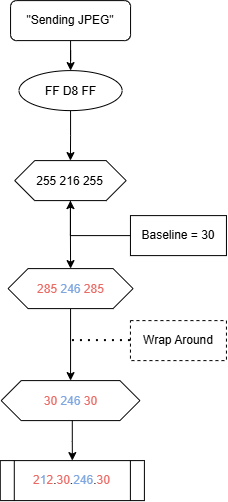
Some bytes become invalid when the baseline is added, as the new value exceeds 255. When this occurs, the value is wrapped back around to a valid byte value, and BC marks the transformation with an even value at the index of the wrapped byte. In doing so, the first octet becomes a ‘key’ that BS can use to decode the received values correctly, adjusting byte values as needed.
Bilby is not intended for malicious use in real-world environments.
Notes on Using Bilby
To avoid having to restart BS every time a different command has to be issued, BS will check a predefined file for the command it should send to BC’s heartbeat request. The default version of BS looks for a file named “hbt_command”, though this can be changed. hbt_command can be edited while both BS and BC are running, though depending on the length of time between each BC heartbeat, it may end up executing half-typed commands.
When a file is exfiltrated using bilby, the file outputted by BS is compressed, and can be uncompressed using the 7zip/7z utility. BC compresses the target file to minimize the amount of data being sent.
Due to the lengthy mappings of characters used when translating bash commands to bilby-readable commands, bilby_cmd_interface can be used to input your bash command and have it automatically written to the hbt_command file used by BS. On account of this, bilby can be used without memorization of the character mappings; however, any custom mappings meant to further obfuscate communications between BC and BS must therefore be done by hand, and necessitate updating bilby_cmd_interface to ensure future translations remain accurate.
Bilby is currently suited for use on Unix and Unix-like systems.
File Exfiltration
Here, a JPEG is exfiltrated: the first three bytes of the file – FF D8 FF – are prepared, wrapped, and sent to BS. Red denotes a wrapped value, while blue denotes an unwrapped value.
C2 Communication
Hostnames returned from BS are used to communicate commands for BC to execute. bilby currently supports basic C2 commands:
- bash commands
- targeted data exfiltration
BC is able to send three bytes at a time while communicating with BS, and as such is not suited for exfiltrating large files quickly; smaller files and C2 commands are the best fit for this tool’s usage.
Once it is running, BC will continuously send heartbeat data to BS.
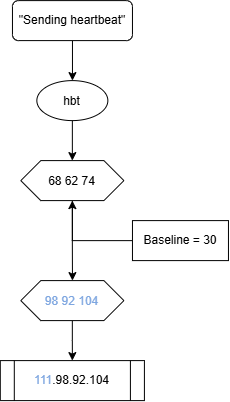
BS may optionally reply with commands for BC to execute, but is not required to do so. Commands are specified in the following format:
Exfiltration:       cmd-exfil-[type].[filename-or-filepath].[extension]
C2 Communication:   cmd-bash-[binary's name].[binary's arguments]
Exfiltration Format Examples
For example, when exfiltrating a single file:
cmd-exf-single.test.txt
will tell BC that it has received a command (cmd) to exfiltrate (exfil) the single file (single) test.txt (test.txt).
If a path must be specified, the command format can be changed:
cmd-exf-path.home-dscully-test.txt
this tells BC to use the path /home/dscully/test.txt for locating the file to be exfiltrated.
This command format, though, exposes the server’s intentions very quickly. For that purpose, BC can be modified prior to deployment to include explicit mappings between hardcoded command strings and custom-tailored strings that will be sent by the server. For instance,
cmd-exf-path.home-dscully-test.txt
becomes
nginxplus-al-in.home-dscully-test.txt
Further specification can mask the targeted file(s):
nginxplus-al-in.1f96-lb-github.com
though this requires that you know the name and extension of the targeted file in advance. Client hardcodings cannot be changed without rebuilding the application client-side.
C2 Communication Examples
On BC’s side, each section of the received ‘command’ hostname is broken down as follows:
Sections are:
[0] cmd - bash - bash binary
[1] bash command argument(s)
Each section of the command is expected to hold certain values. This format must be followed for BC to function correctly. Due to the restrictions of characters allowed in DNS PTR responses, not all bash commands can be typed in the native format. For that reason, mappings between symbols and strings allow BC to interpret incoming bash commands correctly without forcing BS to send the native commands:
| {“..”: “80”, “.”: “79”, “ | ”: “78”, “;”: “77”, “’”: “76”, “>”: “75”, “/”: “74”, “-“: “73”} |
For instance, we can send the command:
cmd-bash-cd.80-78-ls
where 80 maps to ‘..’, and 78 maps to ‘;’.
If we want to echo “test” into a file, we would type:
cmd-bash-echo.76hello76-75-test79txt
Note that the command is formatted as “…test79txt” rather than “…test.txt”.